

FXCC Review: Does it Really Provide 0.0 Pips?
USP: Regulated by CySEC & MISA | Zero Commissions & 0.0 Pip Spreads | MT4 & MT5 Platforms
FXCC Overview & Company Background
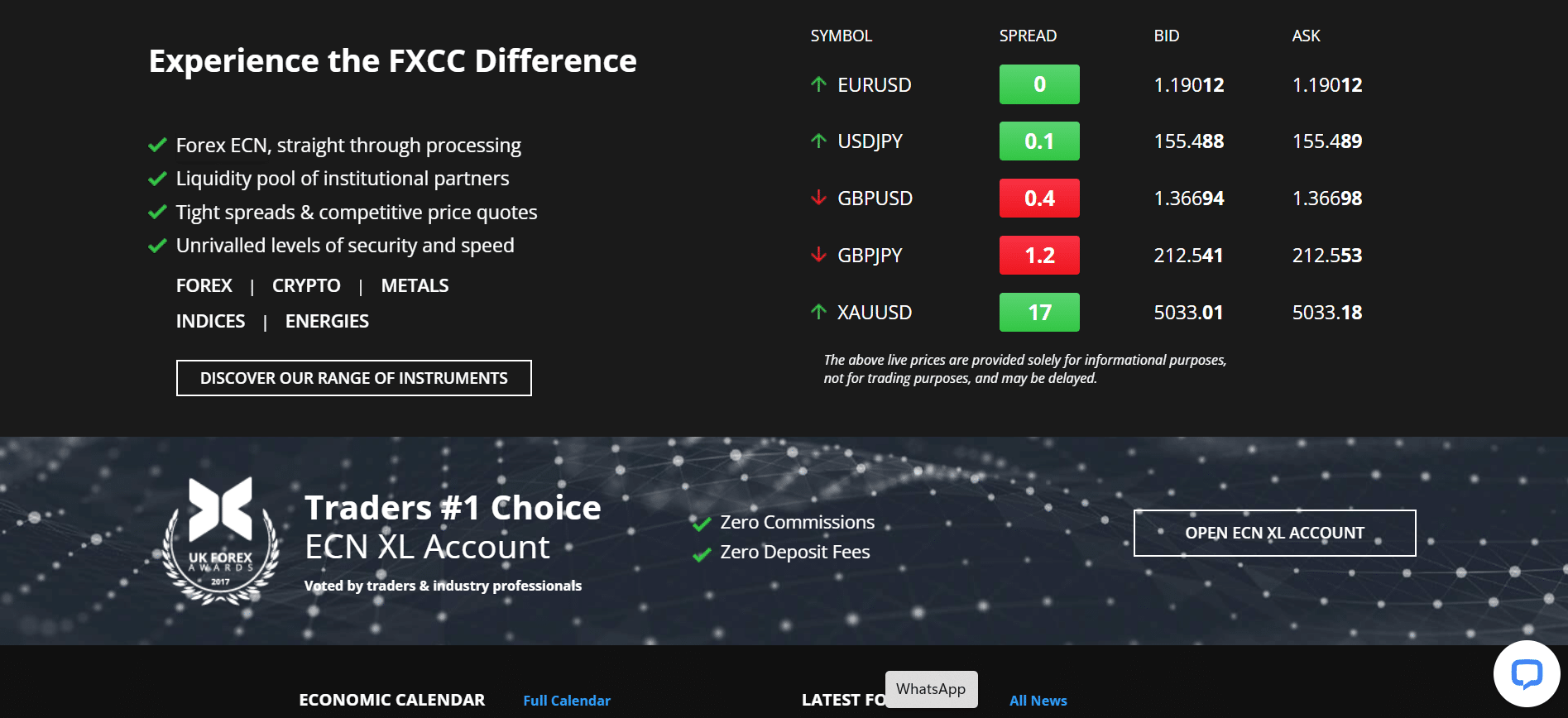
FXCC was founded in 2010 and is headquartered in Nicosia, Cyprus. Over the past decade it has grown into a globally recognized ECN broker, known for transparent STP trading and multiple industry awards. Notably, FXCC’s flagship ECN XL account (also called the “ZERO Account”) offers raw spreads with no commissions, a model that has been voted #1 by traders and industry professionals in recent years. This broker emphasizes a customer-centric mission – aiming to provide fair pricing and empowering tools – which has helped it build a solid reputation in the global forex market.

- 🏦 Headquarters: Nicosia, Cyprus
- 📅 Founded: 2010
- 📜 Regulation: MISA (Comoros), CySEC (Cyprus), VFSC (Vanuatu), SVGFSA (St. Vincent)
- 🌎 Supported Countries: Global (100+ countries, excl. EEA, US, JP)
- 💻 Platforms: MetaTrader 4, MetaTrader 5 (Desktop, Web & Mobile)
- 💵 Min Deposit: $0 (No minimum requirement)
Company Background:
FXCC was established by a team of FX market professionals who sought to create a brokerage service meeting the high standards they expected as traders. From the beginning, the company adopted a true ECN/STP business model, routing client orders straight to liquidity providers with no dealing desk interference. This transparent approach, combined with competitive pricing, has fueled FXCC’s growth. Over the years, FXCC expanded its regulatory footprint – obtaining a CySEC license in Europe and registering in multiple jurisdictions (Comoros, Vanuatu, St. Vincent, Nevis) – to serve a broad international clientele. The broker has garnered global accolades, including awards for Best STP Broker and Best Trading Account (XL Account) from reputable industry organizations. Today, FXCC serves traders from Asia to Africa and beyond (while restricting EEA and US residents), providing multilingual support and a single account type with VIP-level service for all clients. This “broker on your side” ethos is evident in its policies like zero deposit fees and personalized customer care, positioning FXCC as a trusted choice in the retail forex landscape.
Pros & Cons Analysis
- Regulated by CySEC and offshore authorities, supporting compliance and client fund segregation.
- Raw ECN spreads from 0.0 pips with zero commissions on standard accounts.
- Leverage up to 1:1000 with negative balance protection in place.
- Full access to MetaTrader 4 and 5 across desktop, web, and mobile.
- Segregated client funds, negative balance protection, and EU investor compensation coverage.
- Services unavailable in the EU (.com), the US, Japan, and some other jurisdictions.
- No cTrader or proprietary platform, only MT4 and MT5.
- Market research is relatively limited compared to some competitors.
FXCC vs Competitors: Key Differences
- Zero Commission ECN Model: Unlike many ECN brokers who charge a commission per lot on raw spread accounts, FXCC’s ECN XL account has no trading commissions – giving it a clear cost edge over competitors that have similar tight spreads but add commission fees.
- Higher Leverage: With up to 1:1000 leverage, FXCC offers significantly higher leverage than brokers in strict jurisdictions (e.g. EU or Australia capping at 1:30–1:500). This attracts experienced traders needing more flexibility, though it exceeds the limits of heavily regulated competitors.
- Platform Focus: FXCC sticks to the MT4 and MT5 platforms for all clients, whereas some competitors broaden their platform suite with cTrader or custom platforms. Traders who are happy with MetaTrader won’t mind, but those looking for a proprietary platform or social trading networks might find FXCC’s platform choice narrower (FXCC does offer a copy-trading solution instead).
- Promotions & Bonuses: FXCC’s promotional offers, such as the 100% first deposit bonus and free VPS service, are more generous than many established competitors who often provide few or no bonuses. This can be a differentiator for traders seeking extra value.
- Regulatory Profile: While FXCC is regulated (notably by CySEC for EU clients), its global operations use offshore licenses. In comparison, top-tier competitors regulated by the likes of the UK’s FCA or US regulators might instill more confidence for some traders. FXCC’s multi-regulation covers safety basics, but ultra risk-averse clients might prefer brokers under exclusively Tier-1 regulators.
Is FXCC Regulated and Safe?
FXCC’s regulatory structure spans multiple jurisdictions, providing a moderate to strong level of client protection. In Europe, FX Central Clearing Ltd is authorized by CySEC (Cyprus Securities and Exchange Commission) under license number 121/10. This EU Tier-2 regulation means European clients’ accounts have the safeguards of MiFID compliance – including segregated funds and coverage by the Investor Compensation Fund up to €20,000 per client. Globally, FXCC’s primary entity operates under the Mwali International Services Authority (MISA) in Comoros (License No. BFX2024085), supplemented by registrations in St. Vincent & the Grenadines and Nevis. While these offshore licenses (often considered Tier-3) are less stringent than Tier-1 regulators, FXCC still demonstrates a commitment to safety: client funds are kept in top-tier banks under segregation, and negative balance protection is in place to prevent clients from falling into debt. The broker’s long track record since 2010 without major incidents further adds to its credibility. In summary, FXCC is a regulated broker (CySEC for EU, MISA offshore for others) and implements standard safety measures to protect clients’ interests – though risk-conscious traders should note that non-EU accounts are under offshore oversight rather than premier regulators.
Regulatory Licenses:
- MISA (Mwali, Comoros) – International Brokerage & Clearing House License No. BFX2024085
- CySEC (Cyprus) – CIF License No. 121/10 (FX Central Clearing Ltd, for EEA clients)
- VFSC (Vanuatu) – Company Registration No. 14576, licensed as a financial dealer
- SVGFSA (St. Vincent & Grenadines) – Registered LLC No. 2726 LLC 2022 (local registration of FXCC’s entity)
- Nevis FSU – Registered in Nevis under Company No. C 55272 (additional jurisdictional registration)
Safety Measures:
- Client Fund Protection: All FXCC client funds are held in segregated accounts separate from the company’s own funds. This means your deposits are kept with reputable banks and cannot be used by FXCC for operational expenses, reducing the risk of loss in the event of broker insolvency. FXCC also indicates that client monies are secured in leading international banks and that it goes beyond basic legal requirements to ensure funds remain safe at all times. In practice, this protects traders by ensuring that if FXCC ran into financial trouble, clients’ money would be ring-fenced and retrievable.
- Compensation Schemes: European clients trading under FXCC’s CySEC-regulated entity are covered by the Investor Compensation Fund (ICF) of Cyprus. As a member of the ICF, FXCC provides insurance for client deposits up to €20,000 per eligible client if the company were to become insolvent. This compensation scheme acts as a last-resort safety net, bolstering trader confidence. (Note: The ICF applies to CIF-regulated accounts; non-EU accounts under offshore regulation do not have an equivalent compensation fund, so those traders rely on FXCC’s internal safeguards.)
- Negative Balance Protection: FXCC offers negative balance protection, ensuring that clients cannot lose more than their account balance. In volatile markets, losses can sometimes exceed deposits (especially with high leverage), but FXCC’s policy will absorb the excess loss so the trader’s account is not driven below zero. This is a crucial risk mitigation measure – particularly for less experienced traders – as it guarantees you will not owe money to the broker even if a severe market gap occurs.
- Data Security & Encryption: The broker employs robust data security protocols to protect clients’ personal information and trading activity. FXCC uses SSL (Secure Sockets Layer) encryption on its websites and trading portals, which encrypts data during transmission. This means that any sensitive data (login credentials, documents uploaded for KYC, transaction information) is shielded from unauthorized access. Additionally, FXCC continuously monitors its systems for suspicious activity and implements strict privacy policies, ensuring that client data remains confidential and safe from cyber threats.

Trading Conditions & Costs
Trading Specs (At a Glance):
- ✅ Instruments: Forex, Commodities (Metals & Energies), Indices, Cryptocurrencies, Equities
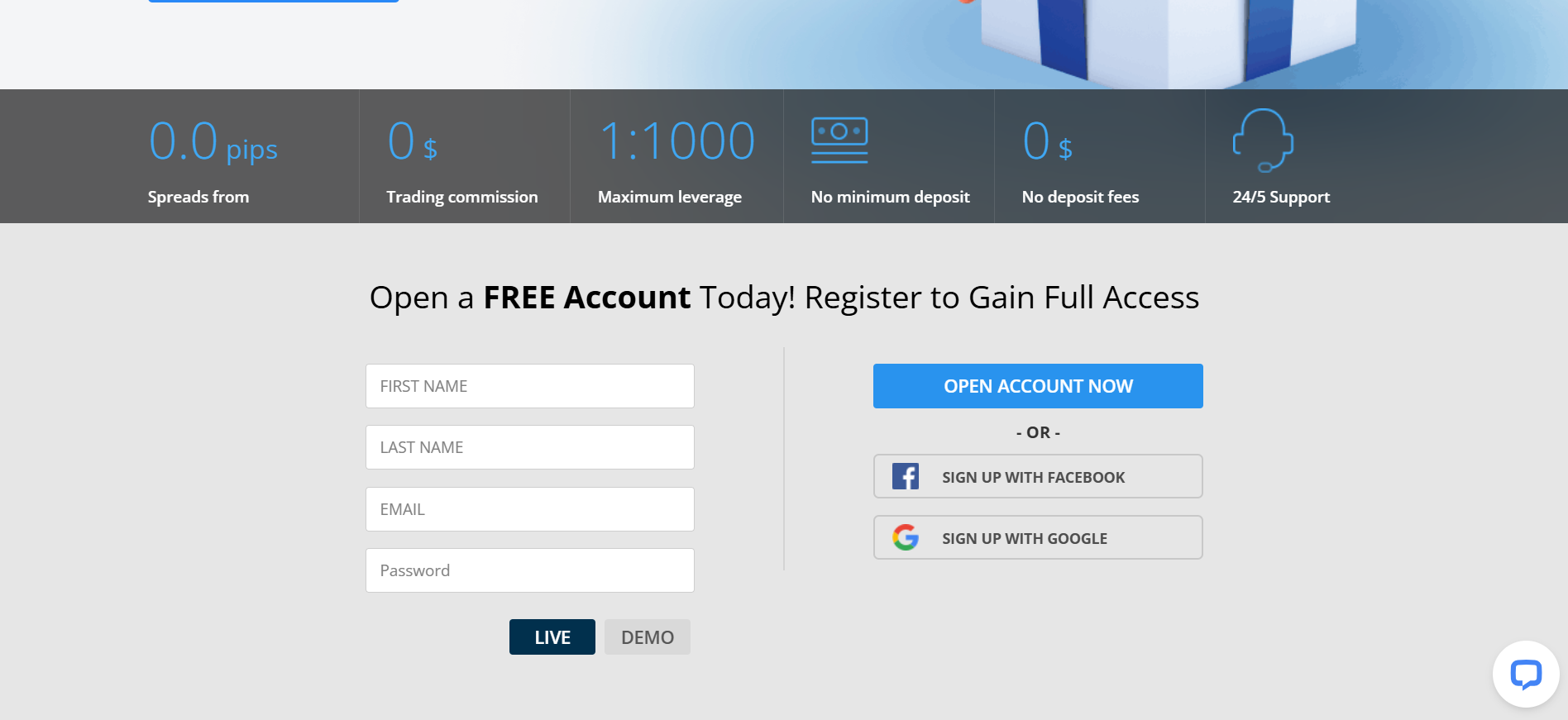
- ✅ Spreads: From 0.0 pips (raw ECN pricing on the XL account)
- ✅ Commission: $0 per lot (No trading commissions on standard account)
- ✅ Leverage: Up to 1:1000 (for global accounts; lower leverage for EU clients)
Now let’s break down and explain each of these trading conditions in detail:
- Instruments: FXCC offers a wide range of trading instruments across multiple asset classes, allowing traders to diversify their portfolios. You can trade over 70 currency pairs in the Forex market (including majors like EUR/USD, minors, and some exotics), plus a variety of CFDs on commodities, indices, crypto, and stocks. This includes precious metals like Gold and Silver, energy products like WTI Crude Oil and Natural Gas, major stock indices (US30, NAS100, FTSE100, etc.), popular cryptocurrencies such as Bitcoin and Ethereum, and even equity CFDs on global companies. All these instruments are accessible from a single account (ECN XL) with FXCC. For traders, this breadth means you can take advantage of opportunities in different markets – for example, hedging a currency trade with a gold position or trading crypto volatility – without needing multiple broker accounts. Whether your interest is in forex trading or beyond, FXCC’s product catalog is robust enough to support multi-asset strategies under one roof.
- Spreads: FXCC is an ECN/STP broker that provides raw variable spreads, which can be as low as 0.0 pips on major pairs during liquid market conditions. In practical terms, this means FXCC streams the best bid/ask prices directly from its liquidity pool of banks and financial institutions, with no markup on the spread. For example, during peak market hours you might see EUR/USD with a near-zero spread. Typical spreads on majors are extremely tight – often just 0.1–0.2 pips – making trading costs very low for clients. It’s important to note that because spreads are variable, they can widen during volatile news or off-peak times, but overall FXCC’s pricing is among the most competitive. The “Average Effective Spreads” published by FXCC confirm consistently tight pricing due to their deep liquidity network and absence of a dealing desk interference. This ultra-tight spread model especially benefits high-frequency traders and scalpers who seek to minimize transaction costs.
- Commission: One standout feature of FXCC is its zero-commission trading structure on the standard ECN XL account. Unlike many brokers who charge a separate commission per lot for raw spread accounts, FXCC charges no commission at all – the only direct cost is the spread itself. Essentially, FXCC’s revenue is derived from the small markup or volume rebates from liquidity providers rather than from a commission on your trades. This is a major cost advantage: for instance, if you trade 1 lot of EUR/USD with a competitor, you might pay $7 round-turn commission plus the spread, whereas with FXCC you pay only the spread (which could be near zero). Over time and volume, the savings are significant. This structure is particularly attractive for scalpers and day traders who do many trades, as well as beginners with small accounts where fixed commissions can eat up a large percentage of profits. It’s worth noting that because there’s no commission, swap/rollover fees and spread are the primary costs to consider – and FXCC even offers swap-free accounts for those who need them (more on that later). Overall, the $0 commission policy makes FXCC’s fee structure very straightforward and trader-friendly.
- Leverage: FXCC provides maximum leverage up to 1:1000 for international clients, which is considerably high. This means you can control a position 1000 times the size of your capital – for example, $1,000 can control $1,000,000 worth of currency. Such high leverage can amplify profits on small market moves, which appeals to experienced traders employing strategies like scalping or those trading low-volatility pairs. However, it equally amplifies losses, so risk management is key. Importantly, EU-regulated clients (under CySEC) are limited to lower leverage (e.g., 1:30 on major FX pairs) due to ESMA regulations – FXCC adheres to those rules on its EU platform. Non-EU traders get the flexibility of higher leverage, but FXCC supports choosing lower leverage levels too if desired. The broker’s trading infrastructure and negative balance protection work in tandem with high leverage: orders are executed via STP with no requotes, and if an extreme move occurs, your account won’t go negative thanks to built-in protections. In summary, FXCC’s leverage offering is very flexible – lower-risk traders can opt for modest leverage, while experienced traders have the option of up to 1:1000 to maximize their trading power, with the broker cautioning to use it responsibly given the risks involved.

FXCC Trading Platforms & Tools
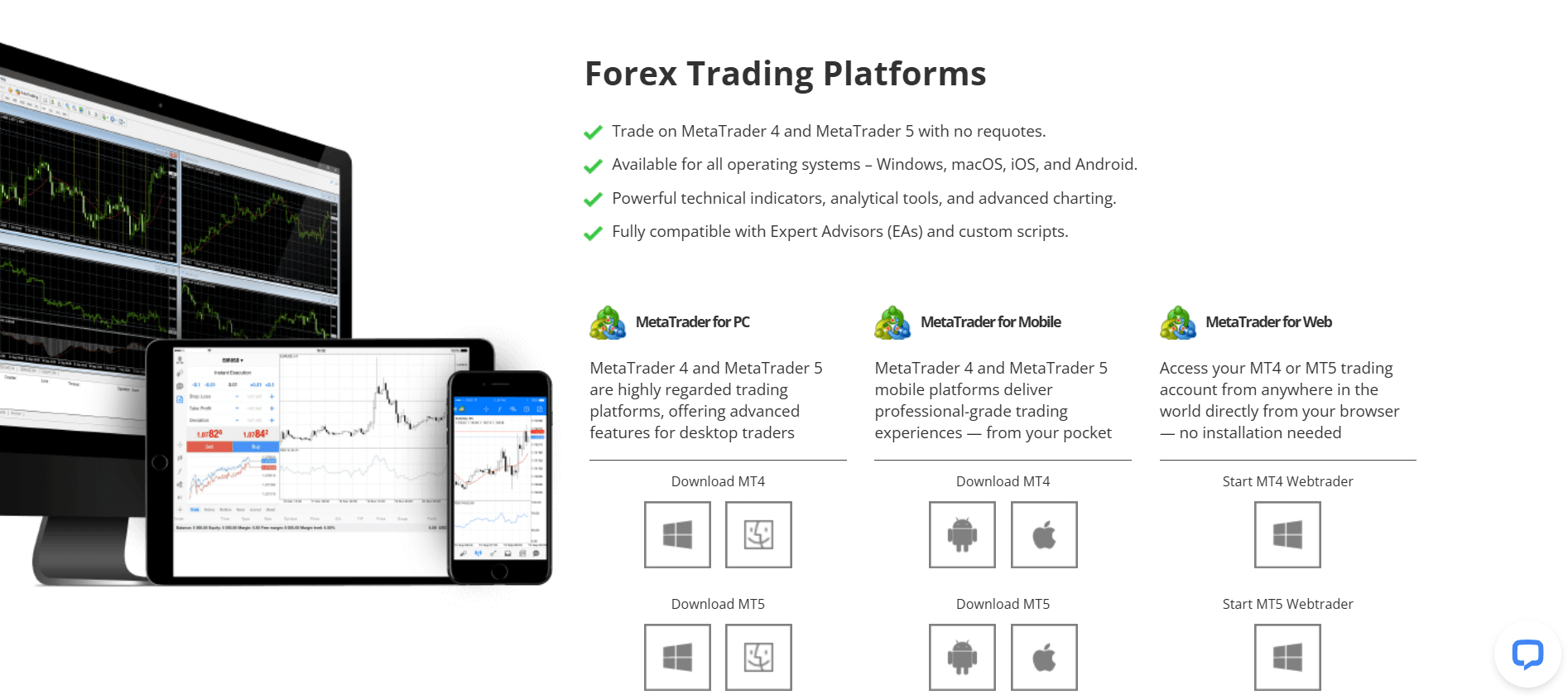
Available Platforms: FXCC supports the industry’s leading trading platforms, ensuring that traders have access to familiar, feature-rich software on all devices:
- ✔ MetaTrader 4 (MT4): Available for PC and Mac desktops, MT4 is the world’s most popular forex trading platform, and FXCC provides it in its full capacity. MT4 with FXCC comes equipped with 30+ built-in technical indicators, multiple chart types, and timeframes, allowing for in-depth technical analysis. Traders can open multiple order types (market, pending, stop orders) and benefit from one-click trading for rapid execution – crucial for scalping given FXCC’s fast STP order routing. MT4’s lightweight design means it runs smoothly even on modest hardware, and FXCC’s servers (located in New York, London, etc.) ensure low latency execution on MT4. Additionally, Expert Advisors (EAs) are fully supported, so clients can run algorithmic trading strategies 24/5 on FXCC’s MT4 without restrictions (even strategies like scalping or news trading are allowed). Overall, MT4 via FXCC offers a stable and customizable trading environment ideal for both beginners and seasoned traders who have come to trust this platform.
- ✔ MetaTrader 5 (MT5): FXCC also offers the newer MetaTrader 5, catering to traders who want an expanded feature set or multi-asset trading. MT5 includes all the functionality of MT4 and adds improvements: more timeframes, additional technical indicators, an integrated Economic Calendar, and a Depth of Market (DOM) view for level 2 pricing. With MT5, FXCC clients can trade not only forex but also CFDs on indices, commodities, crypto, and equities all from one platform interface. MT5’s programming environment (MQL5) is powerful for developing custom indicators and EAs, and FXCC supports those advanced tools as well. The platform is available on desktop and has a web-based version and mobile apps, just like MT4. For traders who require features like hedging vs. netting modes or want to utilize MT5’s Strategy Tester for backtesting, FXCC’s MT5 offering is ideal. Importantly, no requotes are enforced on MT5 with FXCC – you get direct market execution at the best available price. This platform is a great choice for those who want a more modern interface or need the extra analytical tools MT5 provides while trading with FXCC’s low-cost, ECN conditions.
- ✔ WebTrader (MT4/MT5 Web): For convenience and accessibility, FXCC provides WebTrader versions of both MT4 and MT5 that run directly in your browser with no installation needed. This means you can log into your FXCC trading account from any computer (Windows, Mac, Linux) just by using a web browser, which is perfect for when you’re away from your main device. The WebTrader retains most core functionality: you can analyze charts, place trades, and manage your account on the fly. It’s optimized for speed and will reflect the same live prices and spreads. While WebTrader might not support certain custom plugins or EAs, it is extremely useful for quick access or managing positions when you can’t use the desktop app. Combined with FXCC’s mobile apps, the WebTrader ensures you’re never cut off from the markets – a critical aspect for active traders who need to respond to market movements swiftly. Security is also ensured via encrypted web connections when using the platform.
(FXCC also has a Copy Trading platform called FXCC Copy, which allows social trading – we’ll cover this under tools, as it’s an additional service rather than a primary trading terminal.)
Platform Features: All of FXCC’s platforms come with a rich set of features and tools that enhance the trading experience:
- Advanced Trading Technology & Execution: On both MT4 and MT5, FXCC employs a No Dealing Desk (NDD) execution model with straight-through processing. This means orders are executed directly in the market without dealer intervention, resulting in ultra-fast execution speeds and no requotes. Traders get the price as it is – if liquidity at the requested price is available, the trade fills, otherwise partial fills or next-best price from the liquidity pool. This is crucial for fairness and is especially beneficial for news traders and scalpers who demand quick fills. Additionally, FXCC’s infrastructure (with multiple server locations globally) minimizes latency, giving clients an edge in trade execution. You’ll also find features like one-click trading on the platforms, enabling rapid order entry which, combined with ECN execution, makes it easier to capitalize on fast market moves.
- Multi-Device Accessibility: FXCC ensures you can trade seamlessly across all your devices. The MT4/MT5 platforms are offered on Windows and Mac for desktop, have mobile apps for iOS and Android, and are accessible via WebTrader. This cross-platform support means you can open or close a trade on your PC and later monitor it on your phone, or even execute an emergency trade from a web browser if needed. The mobile platforms retain many features like interactive charts and indicators, so you’re not handicapped when away from a desktop. Whether you prefer the full-featured desktop experience or the flexibility of mobile, FXCC’s platform suite has you covered. This is particularly useful for active traders who need to keep an eye on positions throughout the day – you can set alerts, check news, and manage orders on the go with ease.
- Powerful Analytical Tools: Both MT4 and MT5 provided by FXCC come equipped with a comprehensive range of technical analysis tools. Traders have access to dozens of built-in indicators (trend, oscillators, volume indicators, etc.), and the ability to overlay or combine them on charts. Charting is highly customizable – you can use multiple chart windows, apply different timeframes from 1-minute up to monthly, and utilize drawing tools to mark support, resistance, trend lines, Fibonacci retracements, and more. MT5 further expands the toolkit with additional indicators and graphical objects. These platforms also allow for custom indicators: if the default tools are not enough, you can code or install custom ones (there’s a vast library available in the MetaTrader community). FXCC supports all these capabilities, meaning you can tailor your analysis approach exactly as needed. Whether you’re a price action trader or rely on complex indicator strategies, the platform provides the functionality to analyze markets deeply before making decisions.
- Automated & Algorithmic Trading: FXCC’s platforms are fully compatible with Expert Advisors (EAs) and algorithmic trading strategies. This feature lets traders automate their trading – you can deploy EAs that analyze the market and execute trades on your behalf based on pre-defined logic. For example, you might use a scalping EA that takes advantage of FXCC’s tight spreads overnight, or a hedging EA that manages risk across correlated instruments. FXCC imposes no restrictions on the use of EAs, hedging, or scalping – in fact, their trading conditions (fast execution, no minimum stop-distance) are very EA-friendly. Additionally, copy trading functionality is available through the FXCC Copy service, where you can automatically mirror the trades of experienced strategy providers (a form of automation for those who prefer not to program their own EAs). The ability to back-test strategies is present in MetaTrader’s Strategy Tester, so you can optimize an EA using historical data before live deployment. In short, FXCC’s support for automated trading means even when you’re not actively at your screen, your strategies can be working for you – a powerful benefit for those who want to trade systematically 24/5.
Research & Trading Tools: FXCC complements its trading platforms with a selection of research tools and integrations to aid trader decision-making:
- Economic Calendar: On the MT5 platform (and via FXCC’s website), traders have access to an Economic Calendar that lists upcoming economic events, news releases, and economic indicators from around the world. This tool is crucial for fundamental analysis – it shows the date/time of events (like central bank interest rate decisions, GDP releases, Non-Farm Payrolls, etc.), the expected impact, and previous/forecasted values. FXCC’s inclusion of the calendar in-platform means you can plan your trades around high-volatility events or set alerts for them. It’s a platform-native feature on MT5, and MT4 users can access a similar calendar via the FXCC website or plugins. Staying aware of economic events helps traders avoid surprises and seize opportunities from scheduled news.
- Daily Market Analysis: FXCC provides daily technical analysis reports and market commentary through its Research section on the website. They have a team or automated system generating Daily Technical Analysis – often focusing on major currency pairs or other popular assets – highlighting key support/resistance levels and potential trading setups each day. There’s also a “Morning Roll Call” analysis blog that recaps overnight market developments and looks ahead at the coming session, as well as a continuously updated Forex News feed. These resources are freely available to clients and can be accessed alongside trading. While not built into the trading platform, they serve as a handy reference to gauge market sentiment and get trade ideas. For traders who don’t have their own analysis routine or who want a second opinion, FXCC’s research content is a valuable supplement.
- Sentiment & Signal Tools: Through the MetaTrader platform marketplace and possibly through FXCC’s own tools, traders can utilize sentiment indicators and signals. MT4/MT5 allow integration of third-party plugins – for example, a sentiment indicator that shows the percentage of traders long vs short on certain instruments (this can often be obtained via FXCC’s community or MetaTrader’s market). FXCC’s Copy Trading (FXCC Copy) feature effectively acts as a signal service: you can browse performance of strategy providers and copy their trades automatically, which is a form of receiving trade signals and execution in one. Additionally, the platforms come with an in-built news feed (often from reputable newswires) that delivers real-time market news to the terminal – keeping traders informed of breaking news that might affect prices. All these tools, whether platform-native or provided via FXCC’s ecosystem, help traders make informed decisions. They ensure that both technical and fundamental traders have adequate information and that those who prefer a more hands-off approach can lean on signals/copy trading as needed.
Overall, FXCC’s trading platforms and tools are robust and up-to-date with industry standards. The combination of MT4 & MT5 plus additional resources (economic calendar, analysis, copy trading) means traders of all styles – discretionary or automated – have what they need to trade effectively. The broker doesn’t have a proprietary platform, but by focusing on the trusted MetaTrader suite, FXCC ensures stability, familiarity, and a plethora of third-party tools at clients’ disposal.

FXCC Account Types & Minimum Deposit
FXCC keeps things simple by offering essentially one core account type for retail traders – the ECN XL account – with uniform conditions for all. (They sometimes brand promotional variants or have a Corporate account for institutional clients, but all retail traders get the same advantageous terms.) Below is a breakdown of the account types as per FXCC’s official offerings:
| Account Type | Minimum Deposit | Spread (Typical) | Commission | Platforms |
| ECN XL Account (Standard) | $0 (No minimum) | Floating from 0.0 pips | $0 (No commission) | MT4, MT5 (Desktop/Mobile/Web) |
| ECN Promo Account (Limited Offer) | $0 (No minimum) | Floating from 0.0 pips | $0 (No commission) | MT4, MT5 (same as XL) |
| Corporate Account (Institutional) | $100,000 (recommended) | Tight spreads (from ~0.1 pips) | Custom (likely zero or negotiable) | MT4, MT5 (dedicated services) |
Table Notes: The ECN XL is the flagship account that nearly all individuals will use – it requires no minimum deposit, so you can start with any amount, and it features raw ECN spreads starting at 0.0 with no commissions. The ECN Promo account has identical trading conditions to ECN XL; it’s essentially a marketing variant often tied to bonus promotions (for example, a 100% deposit bonus may be associated with the “Promo” period). The Corporate Account is designed for companies or high-net-worth clients looking to trade through a corporate entity – it typically has a very high minimum deposit (around $100k) and may offer personalized conditions or additional services (like a dedicated account manager or different leverage limits). Most retail traders won’t need a corporate account unless operating as a business; the trading conditions are similar, though sometimes corporate accounts might have slightly different fee structures or require manual setup via FXCC’s team.
Special Features: Beyond standard account parameters, FXCC provides several special account options and features to accommodate different client needs:
- Demo Account: FXCC offers free demo trading accounts for beginners and those who want to test the platform. The demo account mirrors the ECN XL account conditions – you get access to MT4 or MT5 with real-time quotes and volatility, and a virtual balance (usually $10,000 in virtual funds by default) to practice trading. There’s no risk since you’re not using real money, which makes it ideal for learning how to place orders, try out strategies, or familiarize yourself with FXCC’s execution. The demo is unlimited in duration, meaning you can use it as long as you need (some brokers time-limit their demos, but FXCC allows you to renew or keep using it). It’s highly recommended to start on the demo if you’re new – you can simulate trades on forex pairs, test how the 0.0 spread environment feels, and only move to live when comfortable. Opening a demo is straightforward on the FXCC website, and it’s an invaluable tool to gain confidence without financial risk.
- Islamic (Swap-Free) Accounts: FXCC caters to clients who require Sharia-compliant trading by offering Islamic accounts, which are swap-free. Any FXCC client can request to convert their live account into an Islamic account (or specify it during signup). In a swap-free account, overnight interest (swap) charges on positions are eliminated, ensuring that no interest is paid or earned – aligning with Islamic finance principles. FXCC makes this available with no additional fees or charges, unlike some brokers that impose a flat fee in lieu of swaps. The absence of swaps is beneficial not only for those with religious considerations but also for traders who hold positions long-term and want to avoid rollover costs. However, there might be a holding time limit on certain instruments if misuse is detected (to prevent abuse of swap-freeness on high-yielding currencies). Overall, the process is transparent: you get the same trading conditions (spreads, leverage, etc.) just with no overnight financing cost. This feature shows FXCC’s inclusivity, enabling Muslim traders (and others who prefer no swaps) to trade freely on the platform.
- VIP / Premium Accounts: While FXCC doesn’t have multiple tiered account levels (since even the standard account already offers premium conditions), it effectively treats all its clients with VIP-level service. The company often mentions that each client enjoys personal, unrivaled support “as if they are a VIP” regardless of account size. Practically, this means tight spreads and zero commissions are available to everyone (benefits that some brokers reserve for high-deposit VIPs). That said, high-volume or large-balance traders at FXCC do get some extra perks. For example, FXCC provides a Free VPS service to clients once they meet a certain deposit or volume threshold, which is a typical VIP benefit (ensuring those running EAs or complex strategies have stable execution). Additionally, such clients might receive a dedicated account manager who can assist with faster support or custom requests. In essence, FXCC’s philosophy is to not segregate clients by tiers too much – the ECN XL is already like a VIP account in terms of low cost – but they still ensure that their most active traders have all the resources (like VPS, priority support) needed for an optimal trading experience.
- Managed Accounts: FXCC itself does not offer PAMM/MAM managed accounts where a manager trades on behalf of multiple investors through the broker’s system (at least not in its retail offering). Instead, it leans on the FXCC Copy Trading platform to fill this need. Through copy trading, clients can effectively have their accounts managed by subscribing to experienced strategy providers – the trades are copied in proportion to your account, which is akin to a managed account but you retain control (you can start/stop copying anytime). This approach is more flexible and transparent than traditional managed accounts. For traders who are money managers, FXCC’s infrastructure (with fast execution and allowance of all strategies) is quite suitable – a manager could operate a master account and use third-party trade copier software to manage multiple client accounts if needed. But formally, if you are an investor looking for someone to trade for you, FXCC’s solution would be to utilize their copy trading marketplace to find a trader to follow. In summary, while you won’t find a branded “PAMM account” at FXCC, the broker does facilitate account management via copy-trading. And importantly, there’s no additional fee from FXCC for this service (though profit sharing arrangements would be between you and the strategy provider if applicable).
Deposits & Withdrawals
FXCC provides a variety of deposit and withdrawal methods, making it convenient for clients worldwide to fund their accounts and withdraw profits. The broker prides itself on a “zero deposit fee” policy and generally fast processing times for payments. Below, we outline the available options and key details for deposits and withdrawals:
Deposit Methods: (All deposit options at FXCC come with no fees charged by the broker, and most are processed quickly.)
- Bank Wire Transfer: Traditional bank transfers are accepted in major currencies (USD, EUR, GBP, etc.). This method is useful for large deposits. Processing time: typically 2–5 business days for international wires to reach FXCC, depending on your bank. FXCC does not charge incoming wire fees, but your bank or intermediary banks might deduct a transfer fee. There’s effectively no minimum deposit on FXCC’s side (you can wire any amount), though very small amounts aren’t practical given bank fees. Bank wires are a secure method and often used if other options are not available in your country.
- Credit/Debit Cards: FXCC supports Visa and MasterCard deposits. Processing time: usually within one hour – card deposits are near-instant once approved. The minimum deposit via card can be as low as $20, making it easy for new traders to start with a small amount. FXCC covers the card processing fees (which are around 2% normally) under its zero-fee policy, so if you deposit $100 by card, you get the full $100 in your account. Cards are one of the most convenient methods, available 24/7, and ideal for instant top-ups if you need to quickly add margin. Withdrawals to cards are also supported (up to the original deposit amount). Using a card adds flexibility – you can fund your account at any time and start trading immediately without waiting for bank clearance.
- E-wallets (Skrill / Neteller / etc.): FXCC offers a range of popular online payment wallets for deposit, including Skrill, Neteller, and others. Processing time: instant to within 1 hour in most cases. With e-wallets, once you confirm the payment, the funds appear in your trading account almost immediately. FXCC’s zero-fee policy means even though Skrill/Neteller might normally charge 2–3% fee, FXCC reimburses those – you deposit $100, you see $100 in balance. These methods typically have a minimum (around $50) and high maximum limits, making them suitable for both small and fairly large deposits. E-wallets are very convenient for international clients since they support multiple currencies and local funding methods. They also keep your bank/card details private from the broker. For traders who already use Skrill/Neteller, FXCC’s support of them makes funding and withdrawals extremely quick and painless.
- Cryptocurrency Payments: Uniquely, FXCC allows deposits in certain cryptocurrencies via third-party processors (often through Skrill’s crypto options or similar). Supported coins include Bitcoin (BTC), Ethereum (ETH), and Tether (USDT) among others. Processing time: depends on blockchain confirmations – generally within a few hours (once the transaction gets the required confirmations, FXCC credits your account). Crypto deposits can be convenient if you hold crypto funds; however, note that blockchain network fees apply (for example, FXCC mentions a ~2% mining fee or processing fee on crypto deposits). FXCC doesn’t itself charge beyond that – the fee is to cover the conversion of crypto to fiat for your trading account. This option is great for clients in regions where other methods are difficult or for those who prefer the privacy of crypto. Always double-check wallet addresses and follow FXCC’s crypto deposit instructions carefully to ensure a smooth transfer.
(Other regional methods: FXCC may support additional local payment options like China UnionPay, Sofort, Rapid Transfer, Paysafecard, etc., often facilitated via Skrill’s network. These methods cater to specific countries – e.g., UnionPay for China, Sofort for Germany, etc. Processing times are generally instant for deposits, and FXCC’s no-fee policy covers them, though some have deposit limits. If you see one of these in your FXCC client portal, it’s an available option for your region, providing further flexibility in funding.)
Withdrawal Methods: (FXCC aims to process withdrawal requests quickly – typically within one working day – and offers multiple payout options. Notably, FXCC generally does not charge withdrawal fees either, except in certain cases or methods as noted.)
- Bank Wire Transfer: All clients can withdraw via bank wire. Processing time: FXCC processes the withdrawal internally within 1 business day, then the bank transfer itself takes ~2–7 business days to reach your bank (variation depends on country/bank). Bank wire is usually the method for withdrawing profits that exceed the amounts deposited by card or e-wallet (due to regulations, brokers often send excess funds by bank). FXCC doesn’t levy a fee, but intermediary banks may subtract $20–$30 as handling fees on the way (common in international wires). It’s recommended to withdraw larger sums via bank transfer for efficiency. Minimum withdrawal by wire is $50 (FXCC’s policy). This method is reliable and secure for receiving your funds, albeit not the fastest.
- Credit/Debit Cards: If you deposited by card, FXCC can send withdrawals back to the same card up to the total amount you originally deposited. Processing time: FXCC approves within a day, then it typically takes 3–10 business days for the credit to appear on your card statement (the delay is due to card processing networks). There’s no fee from FXCC for card withdrawals. This method is convenient for withdrawing your initial deposit or profits up to that amount – the money will simply reduce your card balance or come as a refund. Do note that card withdrawals cannot exceed what was deposited by card (you can’t “profit” onto a card; profits have to go by another method like wire or e-wallet). Nevertheless, it’s a straightforward way to return funds to the source and usually the first route for smaller withdrawals.
- E-wallets (Skrill / Neteller): Withdrawals to e-wallets are often the fastest way to get your money. Processing time: FXCC processes within 24 hours, and once processed, the funds appear in your Skrill/Neteller account almost instantly or within the same day. Many traders prefer this as you can then use the e-wallet balance immediately (transfer to your bank, use an e-wallet debit card, or make online purchases). FXCC does not charge withdrawal fees to e-wallets, but the e-wallet provider might have a small fee for receiving or sending from their system – still, it’s usually minimal. The minimum withdrawal is $50. E-wallet withdrawals are ideal for those who deposited that way or those who want quick access to profits. It’s also useful if you want to withdraw in a different currency than your bank (the e-wallet can handle some conversion).
- Crypto Withdrawals: If you deposited via crypto (or even if not, sometimes brokers allow withdrawing via crypto if arranged), FXCC can payout in cryptocurrency to your wallet. Processing time: about 1 business day for FXCC to process, then additional time for blockchain confirmation (usually 1 hour up to a few hours depending on network congestion). You’ll receive BTC, ETH, USDT or the chosen crypto at the wallet address you provide. There are typically no FXCC withdrawal fees, but network miner fees will be deducted (or you need to have enough in crypto to cover them). Crypto withdrawals could be advantageous if you want to hold your funds in crypto or if other channels are hard – you get your USD balance converted to, say, USDT and sent to you. Always ensure your wallet info is correct to avoid any loss. This method adds a modern alternative for receiving funds.
(Note: For compliance, FXCC will require that withdrawals are sent back to the same source used for deposit whenever possible. This means if you deposited $500 via Neteller and made profit, you’ll likely be asked to withdraw $500 back to that Neteller, and additional profits can then go via an alternative method like bank wire. This is standard anti-money-laundering practice. Also, FXCC’s back office may ask for additional verification (like ID or card proof) when you submit a withdrawal, if not already done during account verification, to ensure security.)
Processing Details:
- Processing Time: Deposits are generally very quick – most funding methods are processed within an hour or even instantly (e.g., cards and e-wallets show up almost immediately in your trading account). Bank transfers take longer to arrive (a few days) as mentioned. Withdrawals are processed by FXCC’s finance team typically within one business day (24 hours) of your request approval. After that, the time to reach you depends on the method: e-wallet withdrawals often arrive the same day (once processed), card withdrawals take a few days to reflect, and bank wires take a few business days to clear. Overall, FXCC is known to handle payouts efficiently, and you can track the status of your withdrawal in the client portal.
- Deposit Fees: None. FXCC has a zero deposit fee promotion/policy, meaning they cover any transaction fees for all supported deposit methods. If, for example, your credit card or e-wallet transaction incurs a fee (say 2-3%), FXCC will pay it – you will still get the full amount in your trading account. This policy is subject to fair use; for instance, they cover up to 100 base currency units of deposit fees per client as a courtesy. In practice, you won’t notice any fee deduction on deposit. Do note, if you deposit and then withdraw immediately without trading, FXCC reserves the right to not cover those deposit fees (to prevent abuse of the free deposit policy). But as long as you’re actually trading, all your deposits via card, e-wallet, etc., cost you nothing extra – a great benefit that not all brokers offer.
- Withdrawal Fees: No direct fees are charged by FXCC for withdrawals in most cases. You will receive the full amount from FXCC’s side. However, be aware of potential external fees: for example, if you withdraw via bank wire, intermediary banks might take a fee (this isn’t FXCC charging it, but the banking system). Similarly, some e-wallets might deduct a small percentage when you move funds from the wallet to your bank. FXCC’s own policy is to keep withdrawal free, and clients report that withdrawing profits doesn’t come with surprise charges from the broker. One thing to remember: the minimum withdrawal amount is $50 for any method (requests smaller than that might not be processed, largely because fees would make it impractical). Overall, the cost to withdraw from FXCC is minimal – just plan for any third-party banking charges if applicable.
- Minimum / Maximum Limits: Deposits: FXCC does not impose an overarching minimum deposit – you can start with $1 if you really wanted (the trading account has no set minimum). That said, different methods have their own minimums: e.g., credit card deposits require at least $20, Skrill/Neteller typically $50, bank wire effectively maybe $100 due to fees. On the upper end, FXCC can handle large deposits; specific methods have max limits (credit cards may have daily limits like $10,000 per day, e-wallets might allow quite high but sometimes have account limits). For very large deposits (hundreds of thousands), a bank transfer is usually the way and FXCC will coordinate if needed. Withdrawals: The minimum per withdrawal is $50. There isn’t a strict maximum per se, but for very large withdrawals, you might break it into chunks or use bank transfer. If you made a huge profit, FXCC may require bank info to send a large sum via wire rather than e-wallet due to caps. Another point: card withdrawals max out at the original deposit amount (because of how card refunds work). Any profits beyond what was put in via card will need to go out via another method (wire or e-wallet). Summarily, FXCC’s funding limits are flexible enough for most traders – small retail traders can start tiny, and big traders can move big sums, with the broker accommodating both ends of the spectrum.
FXCC’s overall approach to deposits and withdrawals is very client-friendly: fast processing, multiple choices, and the broker absorbing fees whenever possible. Just be sure your account is fully verified (KYC documents submitted) before withdrawing, as that’s a regulatory requirement – doing this early will ensure no delays when you want to cash out your trading profits.
How to trade with FXCC? Step-by-Step Guide
Getting started and trading with FXCC is a straightforward process. Here’s a step-by-step guide, from opening your account to executing your first trade:
- Visit the FXCC official website: Navigate to FXCC’s website to begin the signup process. On the homepage, you’ll find an “Open Account” or “Register” button readily available. Click that to start creating your trading account.
- Sign Up / Register an Account: Fill in the registration form with your personal details. FXCC will ask for basic information like your name, email, phone number, and desired account type. Choose a strong password for your login. Make sure to select the correct country of residence and account currency (USD, EUR, etc.) as desired. Submit the form to create your account.
- Verify Your Email and Phone: After registering, FXCC will send a confirmation link to your email. Go to your inbox and click the verification link to confirm your email address. You might also receive an SMS code to verify your phone number. Enter that code in the FXCC portal if prompted. Verifying contact info ensures you can receive account notifications and secure your account.
- Complete KYC – Upload Documents: Log in to the FXCC client portal (the Hub) using the credentials you created. Before you can fully activate your live account, you’ll need to upload KYC documents: typically a proof of identity (such as a passport or driver’s license) and proof of address (like a utility bill or bank statement showing your name and address). FXCC’s compliance team will review and approve these, usually within a few hours to 1 business day. This step is mandatory for regulatory reasons and to enable withdrawals later.
- Fund Your Account: Once your account is verified, proceed to the “Deposit” or “Funding” section in the portal. Choose your preferred deposit method (credit card, e-wallet, bank transfer, etc.). Enter the amount you wish to deposit and follow the on-screen instructions to complete the payment. With FXCC’s zero deposit fees, the amount you fund will be credited in full. Most methods are instant or very quick – you should see your trading account balance update shortly after. Start with an amount you’re comfortable with (remember, FXCC has no required minimum, but ensure it’s enough to cover margin for your first trades).
- Download and Log in to a Trading Platform: With funds in your account, it’s time to trade. Download your chosen platform: FXCC offers MT4 and MT5 for PC, Mac, as well as mobile apps. Download links can be found on FXCC’s site (or you can find MetaTrader in the app stores for mobile). Alternatively, launch the WebTrader in your browser. Open the platform and log in using the trading account credentials (login number and trader password) provided by FXCC (these may be separate from your client portal password). Select the FXCC trading server as instructed in your welcome email.
- Choose Your Trading Instrument: Inside the platform, you’ll have access to all instruments FXCC offers (forex pairs, indices, commodities, etc.). In MetaTrader, look at the “Market Watch” window – you can right-click and choose “Show All” to see the full list. Decide what you want to trade first: for example, the EUR/USD currency pair if you’re starting in forex, or perhaps gold or an index. Drag the symbol onto a chart to view its price movement.
- Analyze the Chart and Apply Indicators: Before placing a trade, do some analysis. Use the charting tools to assess the market. For instance, you might add a Moving Average or RSI indicator to gauge trend and momentum. Identify support and resistance levels, or check FXCC’s daily analysis for insights. The platform’s timeframes allow you to zoom in for short-term analysis or zoom out for the bigger picture. Take a moment to form a trading plan (e.g., “I will buy if price breaks above this resistance,” or “I will sell if it falls to this support”).
- Place Your Trade (Buy/Sell) and Set SL/TP: Ready to execute? Click ‘New Order’ (or one-click trading on the chart). In the order window, select Buy or Sell for your chosen instrument, and enter the lot size (volume) you wish to trade. Be mindful of position size relative to your account balance – use FXCC’s margin calculator if needed. Set a Stop Loss (SL) to control risk (this will automatically close your trade if the market goes against you by a specified amount). Also set a Take Profit (TP) level if you have a target in mind (this will close the trade when a certain profit level is reached). For example, you might buy EUR/USD at 1.1000, set SL at 1.0950 and TP at 1.1100. Once everything is set, confirm the order. Your trade is now live, and you’ll see it in the platform’s Terminal under the Trades tab.
- Monitor and Close the Trade: After entering the market, keep an eye on your position. You can watch the real-time profit/loss in the platform. If you placed SL and TP, you can also step away and the trade will close automatically at those levels – FXCC’s servers will execute your stop or limit order even if your platform is offline. You may also manually close the trade whenever you want: right-click on the open position and select “Close Order” (or hit the ‘x’ in MT4/MT5 trade tab). If your analysis or the market situation changes, you can modify the SL/TP levels by dragging them on the chart or editing the order. Once the trade reaches a conclusion (either hitting SL/TP or manual close), any profit will be added to your balance or loss deducted, and you’ll see the result in your account history.

Customer Support
Having reliable customer support is crucial in the fast-paced world of trading, and FXCC provides multiple channels to assist clients whenever questions or issues arise.
Support Channels: FXCC offers several ways to get in touch with their support team:
- Live Chat: A convenient live chat is available on FXCC’s website and client portal for real-time assistance. This is often the quickest way to get answers – just click the chat icon and you’ll be connected to a representative. Live chat support can help with account questions, platform guidance, or minor technical issues on the spot.
- Email Support: You can reach FXCC via email for more detailed inquiries or if you need to send documents. The support email (for example, [email protected]) is monitored by their team. They typically respond within a few hours to one business day depending on the query complexity. Email is ideal for non-urgent matters or anything that requires a written record.
- Telephone Support: FXCC provides phone support with international contact numbers. Notably, they have a UK phone line (+44 203 150 0832) and a Cyprus phone line (+357 222 12050) for clients. By calling, you can speak directly with a support representative or your account manager. Phone support is great for urgent issues or if you prefer verbal communication. (Note: phone support is available during business hours as per their 24/5 schedule).
- Contact Form: On the “Contact Us” page of FXCC’s website, there’s a web contact form where you can submit an inquiry. You fill in your question and contact details, and the support team will email you a response. This is another alternative if you don’t have immediate access to email.
- FAQ and Help Center: Though not a direct channel, FXCC maintains a detailed FAQ/Knowledge Base covering common questions (from “How to reset my password” to specifics about trading conditions). Many answers can be found there without needing to contact support at all.
Support Hours: FXCC’s customer support operates 24 hours a day, 5 days a week (24/5), aligning with the forex market hours. Specifically, support is active from Monday through Friday, covering all trading sessions (Asian, European, US). This means whether you’re trading late at night or early morning, there will be support agents available to help. Do note that on weekends (when markets are closed), support might not be live except perhaps email responses – any requests sent late Friday or Saturday/Sunday might be addressed by Monday. However, during the trading week, the 24/5 coverage ensures you can always get help in real-time if needed, regardless of your time zone.
Additional Details:
- Multilingual Support: Given FXCC’s global clientele and the website’s availability in many languages, the broker offers support in multiple languages. For example, they have support staff or translators for languages such as English, Arabic, Spanish, French, Russian, Chinese, and more. When you initiate a chat or email, you can usually request service in your preferred language. This is extremely helpful for traders who are not comfortable communicating in English – you can explain your issue in your native language and get assistance accordingly.
- Dedicated Account Managers: FXCC assigns an Account Manager to clients, especially those with larger accounts or under the corporate account category. A dedicated account manager can provide more personalized service – for instance, guiding you through platform setup, informing you about new features or promotions, and checking in on your trading experience. VIP and corporate clients often have direct lines to their account managers. Even regular clients often find the support team remembering their needs if they interact frequently. This personal touch adds to the comfort, as you have a go-to person who understands your trading journey.
- Responsiveness: FXCC’s support is known to be quite responsive and professional. Live chat often connects within a minute or two of waiting time, and the representatives strive to resolve queries on the spot. Email responses typically come on the same day for queries sent during business hours. The support team can help with a range of issues: from technical problems (like trouble logging in to the platform) to explaining a particular trade’s outcome, or guiding how to use an FXCC tool. They also handle account changes (if you need to update info or switch to an Islamic account, for example).
- Client Satisfaction: FXCC places emphasis on customer satisfaction – evidenced by their support ethos of being “on your side.” While internal surveys or metrics aren’t published, client feedback suggests high satisfaction with the support quality. The support team is patient with beginners’ questions (like how to install an indicator) and equally adept at more complex matters (like helping link a copy trading account). They follow up to ensure issues are resolved. Additionally, support can assist in expedited processing – e.g., if you have a withdrawal pending, they can provide status updates or help if there’s a delay beyond the usual timeframe.
In summary, FXCC provides robust customer support through various channels, ensuring help is always within reach during trading days. The combination of 24/5 availability, multilingual service, and a knowledgeable support staff means clients can trade with confidence that any hurdle they encounter can be quickly addressed. Whether you prefer the immediacy of live chat/phone or the thoroughness of email, FXCC’s support team is ready to assist and has a reputation for being friendly and effective – an important factor in making your overall trading experience positive and stress-free.
FXCC Final Verdict
“Ideal for cost-conscious forex traders and scalpers seeking raw spreads, zero commissions, and high-leverage ECN trading on reliable MetaTrader platforms.”
Avoid if: you prefer a broker with fixed spread accounts or extensive local presence. For example, traders who need fixed spreads to avoid pricing uncertainty during news, or those in jurisdictions like the US or EU who cannot open FXCC’s international account, might find FXCC unsuitable. Additionally, if you are uncomfortable with an offshore-regulated entity for global trading (despite the CySEC regulation for EU clients), you may lean toward brokers under your domestic regulators. Finally, those looking for a proprietary trading platform or very advanced research tools beyond the MetaTrader ecosystem might not find those at FXCC.
Bottom Line: FXCC stands out as a competitive ECN broker that delivers excellent value through tight spreads and a commission-free model – effectively lowering the cost of every trade. The broker’s single-account approach means all clients get premium conditions (no need for huge deposits to unlock better pricing), making it very attractive to both newbies and experienced traders. Regulation in multiple jurisdictions (including a reputable EU license) and strong client fund safety measures inspire confidence that FXCC is a trustworthy broker. From our comprehensive review, it’s clear that FXCC excels in offering a low-cost, transparent trading environment with robust platform support. We recommend FXCC for traders who prioritize trading costs and execution quality – it’s a great choice if you want to maximize your trading edge. As with any broker, be mindful of your own trading needs and risk management, but on the whole, FXCC in 2025 delivers a top-tier trading experience that’s hard to fault, especially given its blend of ultra-tight spreads, flexible leverage, and solid customer support.
Frequently Asked Questions
1. Is FXCC a regulated and legitimate broker?
Yes, FXCC is a regulated broker. Its European entity is authorised by the Cyprus Securities and Exchange Commission (CySEC) under license 121/10 and operates under MiFID regulations, while its global operations are licensed by the Mwali International Services Authority (MISA). Founded in 2010, FXCC keeps client funds in segregated accounts and provides Investor Compensation Fund protection up to €20,000 for eligible EU clients.
2. What is the minimum deposit to open an account at FXCC?
FXCC does not require a fixed minimum deposit for its ECN XL account, allowing traders to start with very small amounts as long as sufficient margin is available. However, certain payment providers may apply their own minimum funding limits.
3. Does FXCC charge trading commissions or hidden fees?
FXCC does not charge trading commissions on its standard ECN XL account. Trading costs are included in tight spreads starting from 0.0 pips, with no hidden mark-ups. Deposits are generally free, withdrawals are usually processed without broker fees, and standard overnight swap charges apply unless a swap-free account is selected.
4. Can I open an Islamic account with FXCC?
Yes, FXCC offers Islamic (swap-free) accounts upon request. These accounts eliminate overnight interest charges while maintaining the same trading conditions and do not include additional administrative fees.
5. What platforms and trading tools are available at FXCC?
FXCC supports MetaTrader 4 (MT4) and MetaTrader 5 (MT5) across desktop, web, and mobile devices. Traders also have access to automated trading via Expert Advisors, economic calendars, trading calculators, market analysis, and other essential trading tools.
About Author
Robert J. Williams
Robert J. Williams, an MBA graduate from the University of Southern California with a significant background in finance. Extensive professional experience with top investment firms such as Balt Investment and Globe Investments, enhancing venture capital portfolios and developing sophisticated investment strategies. Contributing expert at PipPenguin, where he simplifies complex financial topics and online brokers for a broad audience, empowering them with the knowledge to succeed in trading.User Reviews
Be the first to review “FXCC Review: Does it Really Provide 0.0 Pips?” Cancel reply
- FXCC Overview & Company Background
- Pros & Cons Analysis
- Is FXCC Regulated and Safe?
- Trading Conditions & Costs
- FXCC Trading Platforms & Tools
- FXCC Account Types & Minimum Deposit
- Deposits & Withdrawals
- How to trade with FXCC? Step-by-Step Guide
- Customer Support
- FXCC Final Verdict
- Frequently Asked Questions
- About Author

There are no reviews yet.